InsightAI
Query your business data in plain English, get charts instantly
Problem
Business teams sit on top of valuable data locked inside spreadsheets, CSVs, and quarterly reports — but extracting insight from that data requires either SQL knowledge or a dedicated data analyst. A question as simple as "What was our best performing product last quarter?" becomes a multi-step process: find the right file, open it, write a formula or query, format the result, and build a chart. Most teams skip the analysis entirely and make decisions on gut feel instead. InsightAI was built to close that gap and put meaningful data answers directly in the hands of non-technical users.
Approach
The core of InsightAI is a conversational BI interface backed by a LangChain agent pipeline. A user uploads a CSV or Excel file through the React frontend. The backend ingests the file, parses the schema, and builds a schema-aware RAG index so the agent understands column names, data types, and relationships before any question is asked.
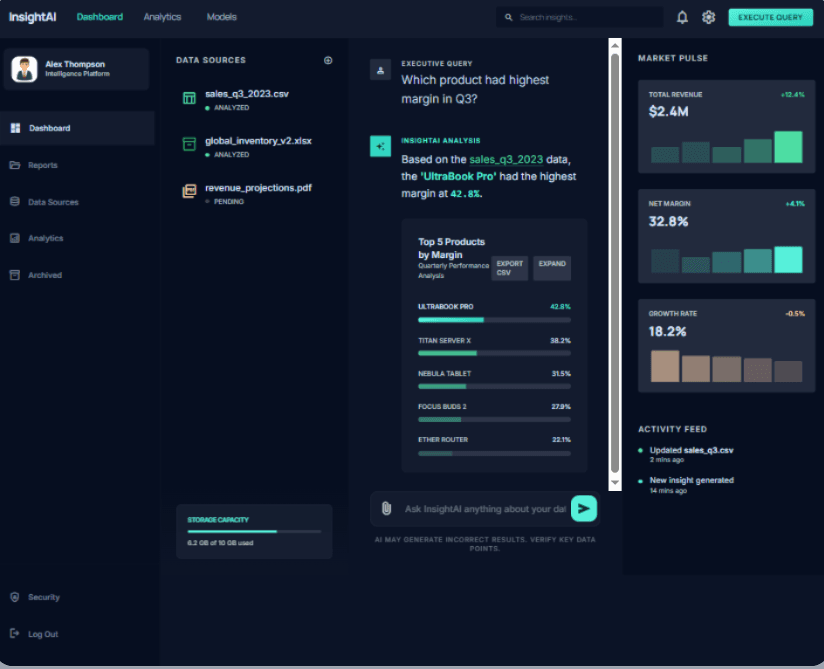
When the user types a question in plain English, the LangChain agent translates it into a Pandas query, executes that query against the uploaded data, and returns two things simultaneously: a concise text answer and an auto-generated chart tailored to the result. If the question asks for a trend, a line chart renders. If it asks for a comparison, a bar chart appears. The chart type is inferred from the shape of the result, not hardcoded.
The FastAPI backend handles file upload, query execution, and streaming the response back to the frontend. The React frontend renders the chat interface and the chart side by side, keeping the experience conversational rather than dashboard-like.
Stack
- LangChain — agent framework that handles natural language to query translation with tool-calling and reasoning steps.
- FastAPI — async Python backend that manages file uploads, query execution, and streaming responses with low latency.
- RAG — schema-aware indexing pipeline that gives the agent accurate context about the uploaded spreadsheet before answering any question.
- Pandas — query execution and data transformation layer that runs the agent-generated queries against the raw file data.
- API Integration — connects the React frontend chart renderer to the FastAPI data pipeline, streaming both text answers and chart payloads in a single response.